Of all the challenges that webmasters face, SEO is one of the most daunting. If you are unsure what it is, SEO stands for Search Engine Optimization, meaning how you as a webmaster can get Google, Yahoo, and MSN among others to rank your website in the top search results for the keywords you are targeting. When I personally approach SEO, I do not look at it as a single all encompassing thing. Instead, I break it down, into the 2 important categories that I can focus on.
In its simplest form, I like to divide SEO down into 2 more manageable areas. The first of two categories is On-site Optimization, and the second area, predictably is Off-site Optimization. Both are important, many webmasters do not grasp or utilize this. Some of them preach that on-site optimization is truly the only important form of SEO, many others will say that off-site optimization is what will get you top rankings in the search engines. But the real deal is that they are both important, and neither should be ignored. So what is the difference between the two.
In a nutshell, On-site optimization is the editing and coding of your actual website to increase optimization. Off-site optimization is the Link Popularity, Link Relevance, and anything else that is not a direct change to your own webpage. For a good example of just how powerful Off-site optimization is, Google the word failure. I am sure that George Bush is not optimizing for that term anywhere on the Whitehouse webpage. In my opinion, the key factors of SEO, in no particular order are:
1) Link Popularity and Link Relevance (Off-site) 2) Internal Linking Structure (On-site) 3) Content Relevance (On-site) 4) Crawl-ability / Code Optimization (On-site)
This might seem like an over simplification of SEO, which in some regards it is. However, the key factors that I just mentioned above are the basis and are easily broken down into much finer detail, such as the kind that you may find in an in-depth book or report. One thing to keep in mind with SEO in 2007 is that getting high rankings on the Search Engines is not going to happen overnight, sometimes not even for months, just because you have optimized your webpage. If this were 7 or 8 years ago, then keyword stuffing and meta-tags would work just fine. But that tactic will just not cut it in todays competitive search engine market. This is no reason to get discouraged however. Just make sure that you utilize a balanced attack of on-site and off-site optimization, through utilization of social-networking sites, link partnering, quality content, text link campaigns and more.
Jonathan Heusman has been involved in marketing online for the past 9 years. Find out the tricks, tools, and tips that he utilizes to gain the competitive edge in internet marketing at his website Major Marketing Tools
e enjte, 27 shtator 2007

How to Improve The Efficiency of Your King Content
There are thousands of articles, books and forum posts which showed that content is king in search engine optimization (SEO). In this article, you can find some ways that can help you improve this king content for your web site.
* Content for people first, not for search engines - Some webmasters make a common mistake that they optimize everything for search engines but forget about web visitors. The goal of our website is not only to get high search rankings, but also to sell our service. So you should give your web visitors what they are really looking for. Make sure your content flows naturally and you're not just trying to stuff more keywords in the interest of search engines. If users don't find your content convincing they won't buy from you.
* Studying popular search terms - High search engine ranking is meaningless if your website only ranks high on terms nobody searches for. You need to ask your colleagues, vendors, competitors, clients, ... or use online tools (e.g.: wordtracker.com) to identify what keywords which potential customers would use to search your web site, then try to use them often, in titles, and throughout the body.
* Building article directory - How can you optimize the content if your web site only offers a simple service? It means there are just several pages in your whole website. So, to increase the content in quality you should write some articles, reviews which are related to your service. A site with more web pages means there are more chances of different terms that will become findable in search engines. You may consider adding free articles to your article directory. On the Internet today, one can find a lot of websites which provide articles free for republishing. Of course you must accept the policy of these web sites and authors before using these articles.
* Making a clear website organization - Build a site which is simple to navigate with a well linking structure. Every page should be accessible from at least one text link. It's better to be sparing with image links, Flash, JavaScript drop-down menus, or other codes that are not HTML based... because the search engine crawlers cannot recognize text contained in these kinds of display. In case using them is required, then make sure a text based menu or a sitemap is also included in the Web site. Last but not least, you should use meaningful words in your URLs, use as simple a web page layout and design as possible.
In conclusion, it is undeniable that content is king in the kingdom of search engines. The quality of your content is the main factor which decides the success in Internet marketing. So improving your content is very necessary.
* Content for people first, not for search engines - Some webmasters make a common mistake that they optimize everything for search engines but forget about web visitors. The goal of our website is not only to get high search rankings, but also to sell our service. So you should give your web visitors what they are really looking for. Make sure your content flows naturally and you're not just trying to stuff more keywords in the interest of search engines. If users don't find your content convincing they won't buy from you.
* Studying popular search terms - High search engine ranking is meaningless if your website only ranks high on terms nobody searches for. You need to ask your colleagues, vendors, competitors, clients, ... or use online tools (e.g.: wordtracker.com) to identify what keywords which potential customers would use to search your web site, then try to use them often, in titles, and throughout the body.
* Building article directory - How can you optimize the content if your web site only offers a simple service? It means there are just several pages in your whole website. So, to increase the content in quality you should write some articles, reviews which are related to your service. A site with more web pages means there are more chances of different terms that will become findable in search engines. You may consider adding free articles to your article directory. On the Internet today, one can find a lot of websites which provide articles free for republishing. Of course you must accept the policy of these web sites and authors before using these articles.
* Making a clear website organization - Build a site which is simple to navigate with a well linking structure. Every page should be accessible from at least one text link. It's better to be sparing with image links, Flash, JavaScript drop-down menus, or other codes that are not HTML based... because the search engine crawlers cannot recognize text contained in these kinds of display. In case using them is required, then make sure a text based menu or a sitemap is also included in the Web site. Last but not least, you should use meaningful words in your URLs, use as simple a web page layout and design as possible.
In conclusion, it is undeniable that content is king in the kingdom of search engines. The quality of your content is the main factor which decides the success in Internet marketing. So improving your content is very necessary.
8 proven methods to get one way links for your website
One way links are very important to get top 10 rankings on search engines. Now Google gives very low importance to reciprocal links as it can easily understand this has been done just to boost search engine rankings and nothing else.
A lot of time people ask me how can i get one way links for my website. In that case i suggest them the following methods to acquire natural one way links:
1 - Write articles- Write meaningful and informational articles on your website so that other people who find you article useful may link to you from their websites. This is one of the best and proven way to get natural one way links.
2 - Blogging - Partcipitae in blogs at other sites or create a blog on your website and post latest news on this blog and discuss it with other people and this again let other sites link to you. Very soon you will find the listing of your blog in lot of other blogs plus other informational sites will also not hestiate in linking you from their website.
3 - Directory Submission - Submit your site to free directories like Dmoz as listing in Dmoz is of great importance. Apart form dmoz there are various other small and big free directories where you can submit your site. This helps you in getting links from subject related to your website. Some other free directories are freeaddurl.org, monkey-directory.com,raptor-uk.com dreamz.mylinea.com, isins.com, ofidir.com.
4 - Forum Participation - Start taking active particiaption in forums that interst you most or on forums that relate to the subject of your website. You can leave a signature in your forum posts which may contain the url of your website with your main keywords in it.
5 - Submit your news and press release - Whenever anything big goes on your site than you can submit your news or press release to other sites that actively publish news of other sites. Like if you are a hosting company and you have launched a new hosting package which is better than others than submit the press release on hosting related sites which accept press releases. This not only provides you inbound link but also brings a lot of traffic to your website.
6 - Free Downloads - If you have developed any sofwtares or if you are able to create any software utlities, scripts, then you can provide them free on your website and this again makes other people to link to your website. You may also request people who downlaod from your site to link to your website so that you can provide them more related and improved stuff in future.
7- Extra Services - If you provide any service to people who own a website than you can ask them to link to your website and in return you can provide them some extra or value added service or extended support with your services. This can be of great interest to most of your clients as everbody loves a thing that comes as free .
8 - Add testimonials - Another added way to get links is to submit testimonials on websites from where you have purchased any services or products as webmasters may publish your testimonials on their website which may also contain the link of your site.
A lot of time people ask me how can i get one way links for my website. In that case i suggest them the following methods to acquire natural one way links:
1 - Write articles- Write meaningful and informational articles on your website so that other people who find you article useful may link to you from their websites. This is one of the best and proven way to get natural one way links.
2 - Blogging - Partcipitae in blogs at other sites or create a blog on your website and post latest news on this blog and discuss it with other people and this again let other sites link to you. Very soon you will find the listing of your blog in lot of other blogs plus other informational sites will also not hestiate in linking you from their website.
3 - Directory Submission - Submit your site to free directories like Dmoz as listing in Dmoz is of great importance. Apart form dmoz there are various other small and big free directories where you can submit your site. This helps you in getting links from subject related to your website. Some other free directories are freeaddurl.org, monkey-directory.com,raptor-uk.com dreamz.mylinea.com, isins.com, ofidir.com.
4 - Forum Participation - Start taking active particiaption in forums that interst you most or on forums that relate to the subject of your website. You can leave a signature in your forum posts which may contain the url of your website with your main keywords in it.
5 - Submit your news and press release - Whenever anything big goes on your site than you can submit your news or press release to other sites that actively publish news of other sites. Like if you are a hosting company and you have launched a new hosting package which is better than others than submit the press release on hosting related sites which accept press releases. This not only provides you inbound link but also brings a lot of traffic to your website.
6 - Free Downloads - If you have developed any sofwtares or if you are able to create any software utlities, scripts, then you can provide them free on your website and this again makes other people to link to your website. You may also request people who downlaod from your site to link to your website so that you can provide them more related and improved stuff in future.
7- Extra Services - If you provide any service to people who own a website than you can ask them to link to your website and in return you can provide them some extra or value added service or extended support with your services. This can be of great interest to most of your clients as everbody loves a thing that comes as free .
8 - Add testimonials - Another added way to get links is to submit testimonials on websites from where you have purchased any services or products as webmasters may publish your testimonials on their website which may also contain the link of your site.
How to get free content for your newsletter, ezine or website
If you have experience in owning websites then you will know that content is king. If you do a simple search in a search engine and look at the results they prove this, the content rich pages will dominate the results. Ezines, or newsletters as they are sometimes known, also require a lot of content because after all content is what they are.
So now that we have learned that content is very important on the internet how do we go about getting content? There are three main strategies you can employ. Firstly you could write your own content. This is a great option if you are knowledgeable in your particular area, and believe you can write interesting content with proper grammar and good spelling. You may not have these qualities though and like many people you may simply not have the time or the motivation. The second main option you have to get content is to hire someone to write for you. This can be a great way of getting content for some people, but it can be very a very expensive method to choose. I come now to third option and to the option that I consider to be the best way of getting content for your newsletter, ezine or website and that is to harvest your content from what are termed article directories.
So what are article directories? Article directories are quite self explanatory really they are basically directories of articles. The reason they are so good for getting content though is that a vast majority of them have it in their own interest for you to use their content. The reason for this is that they allow you to use their content only on their terms, these being that you keep the link showing the source of the content. The writers or authors of the content too stand to gain because in writing their articles they include in the footer a link to their own website. So everyone is a winner in the equation.
So where can you find article directories? There are a number of strategies you can employ to find article directories. The first of which is to use a search engine to search for the term "article directories". Using this method you should find a plethora of websites which are suitable. Another, more easy method though, you could use to find these article directories is to use some of the web addresses of article directories I have listed for you below. At the time of writing all these websites allow you to use their content for your newsletter, ezine, or website providing of course that you follow their terms and conditions.
www.articlecentral.com
www.articlecity.com
www.ezinearticles.com
www.goarticles.com
www.ideamarketers.com
www.netterweb.com
www.turboarticles.com
www.valuablecontent.com
www.article-world.net
www.articlewiz.com
www.articles411.com
www.free-article-search.com
So now you have all the information you need to start filling your newsletters, ezines, or websites with all the free content you could ever need. Good luck!
So now that we have learned that content is very important on the internet how do we go about getting content? There are three main strategies you can employ. Firstly you could write your own content. This is a great option if you are knowledgeable in your particular area, and believe you can write interesting content with proper grammar and good spelling. You may not have these qualities though and like many people you may simply not have the time or the motivation. The second main option you have to get content is to hire someone to write for you. This can be a great way of getting content for some people, but it can be very a very expensive method to choose. I come now to third option and to the option that I consider to be the best way of getting content for your newsletter, ezine or website and that is to harvest your content from what are termed article directories.
So what are article directories? Article directories are quite self explanatory really they are basically directories of articles. The reason they are so good for getting content though is that a vast majority of them have it in their own interest for you to use their content. The reason for this is that they allow you to use their content only on their terms, these being that you keep the link showing the source of the content. The writers or authors of the content too stand to gain because in writing their articles they include in the footer a link to their own website. So everyone is a winner in the equation.
So where can you find article directories? There are a number of strategies you can employ to find article directories. The first of which is to use a search engine to search for the term "article directories". Using this method you should find a plethora of websites which are suitable. Another, more easy method though, you could use to find these article directories is to use some of the web addresses of article directories I have listed for you below. At the time of writing all these websites allow you to use their content for your newsletter, ezine, or website providing of course that you follow their terms and conditions.
www.articlecentral.com
www.articlecity.com
www.ezinearticles.com
www.goarticles.com
www.ideamarketers.com
www.netterweb.com
www.turboarticles.com
www.valuablecontent.com
www.article-world.net
www.articlewiz.com
www.articles411.com
www.free-article-search.com
So now you have all the information you need to start filling your newsletters, ezines, or websites with all the free content you could ever need. Good luck!
How to prevent duplicate content with effective use of the robots.txt and robots tag.
Your primary weapon of choice against duplicate content can be found within “The Robot Exclusion Protocol” which has now been adopted by all the major search engines.
There are two ways to control how the search engine spiders index your site.
1. The Robot Exclusion File or “robots.txt” and
2. The Robots < Meta > Tag
The Robots Exclusion File (Robots.txt)
This is a simple text file that can be created in Notepad. Once created you must upload the file into the root directory of your website e.g. www.yourwebsite.com/robots.txt. Before a search engine spider indexes your website they look for this file which tells them exactly how to index your site’s content.
The use of the robots.txt file is most suited to static html sites or for excluding certain files in dynamic sites. If the majority of your site is dynamically created then consider using the Robots < Meta >Tag.
Creating your robots.txt file
Example 1 Scenario
If you wanted to make the .txt file applicable to all search engine spiders and make the entire site available for indexing. The robots.txt file would look like this:
User-agent: *
Disallow:
Explanation
The use of the asterisk with the “User-agent” means this robots.txt file applies to all search engine spiders. By leaving the “Disallow” blank all parts of the site are suitable for indexing.
Example 2 Scenario
If you wanted to make the .txt file applicable to all search engine spiders and to stop the spiders from indexing the faq, cgi-bin the images directories and a specific page called faqs.html contained within the root directory, the robots.txt file would look like this:
User-agent: *
Disallow: /faq/
Disallow: /cgi-bin/
Disallow: /images/
Disallow: /faqs.html
Explanation
The use of the asterisk with the “User-agent” means this robots.txt file applies to all search engine spiders. Preventing access to the directories is achieved by naming them, and the specific page is referenced directly. The named files & directories will now not be indexed by any search engine spiders.
Example 3 Scenario
If you wanted to make the .txt file applicable to the Google spider, googlebot and stop it from indexing the faq, cgi-bin, images directories and a specific html page called faqs.html contained within the root directory, the robots.txt file would look like this:
User-agent: googlebot
Disallow: /faq/
Disallow: /cgi-bin/
Disallow: /images/
Disallow: /faqs.html
Explanation
By naming the particular search spider in the “User-agent” you prevent it from indexing the content you specify. Preventing access to the directories is achieved by simply naming them, and the specific page is referenced directly. The named files & directories will not be indexed by Google.
That’s all there is to it!
As mentioned earlier the robots.txt file can be difficult to implement in the case of dynamic sites and in this case it’s probably necessary to use a combination of the robots.txt and the robots tag.
The Robots < Meta > Tag
This alternative way of telling the search engines what to do with site content appears in the section of a web page. A simple example would be as follows;
In this example we are telling all search engines not to index the page or to follow any of the links contained within the page.
In this second example I don’t want Google to cache the page, because the site contains time sensitive information. This can be achieved simply by adding the “noarchive” directive.
What could be simpler!
Although there are other ways of preventing duplicate content from appearing in the Search Engines this is the simplest to implement and all websites should operate either a robots.txt file and or a Robot tag combination.
There are two ways to control how the search engine spiders index your site.
1. The Robot Exclusion File or “robots.txt” and
2. The Robots < Meta > Tag
The Robots Exclusion File (Robots.txt)
This is a simple text file that can be created in Notepad. Once created you must upload the file into the root directory of your website e.g. www.yourwebsite.com/robots.txt. Before a search engine spider indexes your website they look for this file which tells them exactly how to index your site’s content.
The use of the robots.txt file is most suited to static html sites or for excluding certain files in dynamic sites. If the majority of your site is dynamically created then consider using the Robots < Meta >Tag.
Creating your robots.txt file
Example 1 Scenario
If you wanted to make the .txt file applicable to all search engine spiders and make the entire site available for indexing. The robots.txt file would look like this:
User-agent: *
Disallow:
Explanation
The use of the asterisk with the “User-agent” means this robots.txt file applies to all search engine spiders. By leaving the “Disallow” blank all parts of the site are suitable for indexing.
Example 2 Scenario
If you wanted to make the .txt file applicable to all search engine spiders and to stop the spiders from indexing the faq, cgi-bin the images directories and a specific page called faqs.html contained within the root directory, the robots.txt file would look like this:
User-agent: *
Disallow: /faq/
Disallow: /cgi-bin/
Disallow: /images/
Disallow: /faqs.html
Explanation
The use of the asterisk with the “User-agent” means this robots.txt file applies to all search engine spiders. Preventing access to the directories is achieved by naming them, and the specific page is referenced directly. The named files & directories will now not be indexed by any search engine spiders.
Example 3 Scenario
If you wanted to make the .txt file applicable to the Google spider, googlebot and stop it from indexing the faq, cgi-bin, images directories and a specific html page called faqs.html contained within the root directory, the robots.txt file would look like this:
User-agent: googlebot
Disallow: /faq/
Disallow: /cgi-bin/
Disallow: /images/
Disallow: /faqs.html
Explanation
By naming the particular search spider in the “User-agent” you prevent it from indexing the content you specify. Preventing access to the directories is achieved by simply naming them, and the specific page is referenced directly. The named files & directories will not be indexed by Google.
That’s all there is to it!
As mentioned earlier the robots.txt file can be difficult to implement in the case of dynamic sites and in this case it’s probably necessary to use a combination of the robots.txt and the robots tag.
The Robots < Meta > Tag
This alternative way of telling the search engines what to do with site content appears in the section of a web page. A simple example would be as follows;
In this example we are telling all search engines not to index the page or to follow any of the links contained within the page.
In this second example I don’t want Google to cache the page, because the site contains time sensitive information. This can be achieved simply by adding the “noarchive” directive.
What could be simpler!
Although there are other ways of preventing duplicate content from appearing in the Search Engines this is the simplest to implement and all websites should operate either a robots.txt file and or a Robot tag combination.
Your RSS Feed Might Look Like Spam
RSS feeds seem to be the breakout technology for the year. With more users turning to them for driving traffic to their site, it’s no wonder that a trail of RSS feed spam is following in the wake. A careful editing of your RSS feed could make the difference between being classified as genuine content or RSS spam.
RSS search engines are just beginning to pick up steam. As more RSS feeds become searchable, the number of visitors will increase and spam is sure to follow. It is an unfortunate side effect of free communication. While RSS users can typically unsubscribe to feeds they deem as spam, browsing with keywords in an RSS search engine is where the problem arises.
RSS spam largely consists of three main types most often found in the RSS search engines. The first type is keyword stuffing.
Keyword stuffing involves filling each RSS feed article with high-value keywords for a specific topic. The articles are not intended for human visitors, but instead for search engine robots to direct traffic to a target web site. This RSS spam technique is nothing more than an adaptation of the typical keyword-stuffed web page, often banned by major search engines.
The second type involves RSS feed link farms. These RSS articles often contain very little content, if any, other than a simple keyword. Their main attraction is the feed title. Clicking the feed title takes the user to a blog containing tens or hundreds of other blogs and RSS feeds, each directing to more links within the farm. The goal of this type of RSS spam is to trick the user into clicking advertisements or directing them to a product web site.
The third type is the creation of fake RSS feeds. These appear as legitimate, but often duplicated, article content. Whether they provide value or not is certainly debatable. These feeds are usually created in mass, using automated scripts, and appear similar in nature to the link farms. By attracting the users to seemingly valuable content, they hope to gain advertisement clicks or product web site traffic.
Your RSS feed might happen to fall into one of these three categories. While you may currently be experiencing increased traffic from the RSS search engines, these directories are working on filtering out the RSS spam techniques. However, you can still take advantage of RSS feeds and their power by following an RSS-friendly guideline.
Refrain from using automated scripts to create online content used by your RSS feeds. Instead, write your own original thoughts, product descriptions, and reviews. It takes a little more time, but the search engines will value this content much more highly, your visitors will appreciate the unique content, and the subscription count to your RSS feed will grow. It is also important to keep your feed updated with changing content as opposed to using a static feed, which remains the same. Search engines value dynamic feeds and will likely rank you higher as a result.
There are tools and services available, which aid in keeping an RSS feed updated with your changing content. Such services include FeedFire for converting your web site content to a periodically updated RSS feed or software such as FeedForAll for creating and editing RSS feeds.
A successful RSS feed is very much the same as a successful web page. It may take a little more time to digitize your thoughts, but the end result is well worth the effort. By avoiding the tricks in RSS feed spam, you can help make the difference in quality of feeds and enjoyment in your readers.
About the Author: ksoft is a software company specializing in Internet products including RSS Submit http://www.dummysoftware.com/rsssubmit.html, software for submitting RSS feeds and pinging blogs to over 65 RSS directories.
RSS search engines are just beginning to pick up steam. As more RSS feeds become searchable, the number of visitors will increase and spam is sure to follow. It is an unfortunate side effect of free communication. While RSS users can typically unsubscribe to feeds they deem as spam, browsing with keywords in an RSS search engine is where the problem arises.
RSS spam largely consists of three main types most often found in the RSS search engines. The first type is keyword stuffing.
Keyword stuffing involves filling each RSS feed article with high-value keywords for a specific topic. The articles are not intended for human visitors, but instead for search engine robots to direct traffic to a target web site. This RSS spam technique is nothing more than an adaptation of the typical keyword-stuffed web page, often banned by major search engines.
The second type involves RSS feed link farms. These RSS articles often contain very little content, if any, other than a simple keyword. Their main attraction is the feed title. Clicking the feed title takes the user to a blog containing tens or hundreds of other blogs and RSS feeds, each directing to more links within the farm. The goal of this type of RSS spam is to trick the user into clicking advertisements or directing them to a product web site.
The third type is the creation of fake RSS feeds. These appear as legitimate, but often duplicated, article content. Whether they provide value or not is certainly debatable. These feeds are usually created in mass, using automated scripts, and appear similar in nature to the link farms. By attracting the users to seemingly valuable content, they hope to gain advertisement clicks or product web site traffic.
Your RSS feed might happen to fall into one of these three categories. While you may currently be experiencing increased traffic from the RSS search engines, these directories are working on filtering out the RSS spam techniques. However, you can still take advantage of RSS feeds and their power by following an RSS-friendly guideline.
Refrain from using automated scripts to create online content used by your RSS feeds. Instead, write your own original thoughts, product descriptions, and reviews. It takes a little more time, but the search engines will value this content much more highly, your visitors will appreciate the unique content, and the subscription count to your RSS feed will grow. It is also important to keep your feed updated with changing content as opposed to using a static feed, which remains the same. Search engines value dynamic feeds and will likely rank you higher as a result.
There are tools and services available, which aid in keeping an RSS feed updated with your changing content. Such services include FeedFire for converting your web site content to a periodically updated RSS feed or software such as FeedForAll for creating and editing RSS feeds.
A successful RSS feed is very much the same as a successful web page. It may take a little more time to digitize your thoughts, but the end result is well worth the effort. By avoiding the tricks in RSS feed spam, you can help make the difference in quality of feeds and enjoyment in your readers.
About the Author: ksoft is a software company specializing in Internet products including RSS Submit http://www.dummysoftware.com/rsssubmit.html, software for submitting RSS feeds and pinging blogs to over 65 RSS directories.
Getting Google to Index - The Basics
Getting Google to Index – the basics
Frequently I come across those who encounter either a perceived delay or other problem in getting their site into Google’s index. Whilst occasionally some sites don’t show within the index it is more common place to find the site in question already within the index but for whatever reason that it wasn’t being looked for correctly.
Has Google found your site?
There is a very simple way to answer this question – enter your URL into Google’s search box.
(eg: www.yourdomain.whatever)
If your site does feature then it will show up a link to the main page, together with the message –
Google can show you the following information for this URL:
If your site fails to feature the following message will greet you –
Sorry, no information is available for the URL
If Google hasn’t found your site
There is no need for immediate panic! What you need to ensure is that you have a few links coming into your site – you don’t need hundreds, at least not to start with.
Probably the easiest way to achieve this is to enter yourself into some basic, perhaps local, directories. These need not be the paid for kind as what you are aiming for is to bring Googlebot/Google’s spider to your site.
(Take a look at SearchGuild’s directory forum for further inspiration.)
Another option would be to arrange a few reciprocal links with sites that are similar to your own – this is basically where you exchange links with each other.
Do not be under the misconception that you need these links to be from high PR sites/pages – more important is that the sites providing you with the links are themselves regularly crawled.
To keep track or see what Google has indexed from your site enter the following into the search box:
site:www.yourdomain.whatever
This will bring up the pages of your site that Google has indexed.
If Google doesn’t crawl beyond your homepage
There can be a few reasons for this. However you should at least give Google a little time to do this. The primary things to check if you feel that Google is definitely showing no interest with the rest of your site are:
Put in a site map – site maps list and link to the other pages within your site. Place a link to one from your home page as it should make for smoother indexing.
Title, description & keyword meta tags – it is best to vary at least the meta description tag on each page so as spiders do not confuse pages as being the same. It also assists with the site being found for different phrases within various search engines.
Robots.txt files – make sure you are not inadvertently blocking spiders out of the other pages with a ‘no-follow’. Unless you know what you are doing and have reason to use this type of file then you are better not doing so.
Navigation – check that your pages are user friendly with functioning internal links. You should have some text links from your homepage directed inwards as well as linking from your internal pages back to the homepage and ensure they all work.
Flash & Javascript – keep both to a minimum, especially on your homepage.
Generally Google is fairly swift at picking up on new sites so getting into the index should not prove a problem for most. However, it can take a while for a whole site to be indexed and unreasonable for you to expect whole inclusion virtually overnight! Another common misconception is if it is a case of your site not ranking where you expect it to then this is not the same as ‘not being indexed’.
Frequently I come across those who encounter either a perceived delay or other problem in getting their site into Google’s index. Whilst occasionally some sites don’t show within the index it is more common place to find the site in question already within the index but for whatever reason that it wasn’t being looked for correctly.
Has Google found your site?
There is a very simple way to answer this question – enter your URL into Google’s search box.
(eg: www.yourdomain.whatever)
If your site does feature then it will show up a link to the main page, together with the message –
Google can show you the following information for this URL:
If your site fails to feature the following message will greet you –
Sorry, no information is available for the URL
If Google hasn’t found your site
There is no need for immediate panic! What you need to ensure is that you have a few links coming into your site – you don’t need hundreds, at least not to start with.
Probably the easiest way to achieve this is to enter yourself into some basic, perhaps local, directories. These need not be the paid for kind as what you are aiming for is to bring Googlebot/Google’s spider to your site.
(Take a look at SearchGuild’s directory forum for further inspiration.)
Another option would be to arrange a few reciprocal links with sites that are similar to your own – this is basically where you exchange links with each other.
Do not be under the misconception that you need these links to be from high PR sites/pages – more important is that the sites providing you with the links are themselves regularly crawled.
To keep track or see what Google has indexed from your site enter the following into the search box:
site:www.yourdomain.whatever
This will bring up the pages of your site that Google has indexed.
If Google doesn’t crawl beyond your homepage
There can be a few reasons for this. However you should at least give Google a little time to do this. The primary things to check if you feel that Google is definitely showing no interest with the rest of your site are:
Put in a site map – site maps list and link to the other pages within your site. Place a link to one from your home page as it should make for smoother indexing.
Title, description & keyword meta tags – it is best to vary at least the meta description tag on each page so as spiders do not confuse pages as being the same. It also assists with the site being found for different phrases within various search engines.
Robots.txt files – make sure you are not inadvertently blocking spiders out of the other pages with a ‘no-follow’. Unless you know what you are doing and have reason to use this type of file then you are better not doing so.
Navigation – check that your pages are user friendly with functioning internal links. You should have some text links from your homepage directed inwards as well as linking from your internal pages back to the homepage and ensure they all work.
Flash & Javascript – keep both to a minimum, especially on your homepage.
Generally Google is fairly swift at picking up on new sites so getting into the index should not prove a problem for most. However, it can take a while for a whole site to be indexed and unreasonable for you to expect whole inclusion virtually overnight! Another common misconception is if it is a case of your site not ranking where you expect it to then this is not the same as ‘not being indexed’.
Submit Your Article- Who, Where and What
Here are a few places where you can submit your articles for
maximum exposure.
1) Article Banks
2) Article Directories
3) Forums
4) Search Engines
5) Announcement Lists
6) Blog Owners
7) Newsletter Publishers
8) Webmasters
9) MSN Spaces
10) Your Blog
11) MSN Groups
12) Yahoo Groups
13) Google Groups
14) EBay About Me Page
15) Adlandpro
You can use these professional services to submit your articles:
1) http://WWW.Isnare.com
2) http://WWW.Thephantomwriters.com
3) http://WWW.Reprintarticles.com
4) http://WWW.Opportunityupdate.com
5) http://WWW.Submityourarticle.com
6) http://WWW.Ezinetrendz.com
Here are two software that you can use to automate your
submissions :
1) The Ezine Announcer available at http://WWW.Ezineannouncer.com
2) Newsletterpromote.com available at
http://WWW.Newsletterpromote.com
With such a list to choose from there should be no complaining
about where to publish your articles. And don’t forget to
optimize your title, headings, sub-headings, body text and links
to add that extra punch.
maximum exposure.
1) Article Banks
2) Article Directories
3) Forums
4) Search Engines
5) Announcement Lists
6) Blog Owners
7) Newsletter Publishers
8) Webmasters
9) MSN Spaces
10) Your Blog
11) MSN Groups
12) Yahoo Groups
13) Google Groups
14) EBay About Me Page
15) Adlandpro
You can use these professional services to submit your articles:
1) http://WWW.Isnare.com
2) http://WWW.Thephantomwriters.com
3) http://WWW.Reprintarticles.com
4) http://WWW.Opportunityupdate.com
5) http://WWW.Submityourarticle.com
6) http://WWW.Ezinetrendz.com
Here are two software that you can use to automate your
submissions :
1) The Ezine Announcer available at http://WWW.Ezineannouncer.com
2) Newsletterpromote.com available at
http://WWW.Newsletterpromote.com
With such a list to choose from there should be no complaining
about where to publish your articles. And don’t forget to
optimize your title, headings, sub-headings, body text and links
to add that extra punch.
Meta Tags - What Are They & Which Search Engines Use Them?
Defining Meta Tags is much easier than explaining how they are used, and by which engines. The reason is very few engines clearly lay out what they do and do not look at, and how much emphasis they put on any one factor. So, we’ll start with the easy part
Meta Tags are lines of HTML code embedded into web pages that are used by search engines to store information about your site. These "tags" contain keywords, descriptions, copyright information, site titles and more. They are among the numerous things that the search engines look for, when trying to evaluate a web site.
Meta Tags are not "required" when you're creating web pages. Unfortunately, many web site operators who don’t use them are left wondering why the saying "If I build it they will come" didn’t apply to their site.
There’s also a few naysayers in the search engine optimization industry who claim that Meta Tags are useless. You can believe them if you like, but you would be wise not to. While not technically "required", Meta Tags are essential.
If you simply create a web site and register the URL with the search engines, their spiders will visit your site, and attempt to index it. Each search engine operates slightly differently, and each one weighs different elements of a web site according to their own proprietary algorithms. For example, Altavista places an emphasis on the description tag and Inktomi states on their web site that;
Of course, not all search engines work this way. Some place their emphasis on content. The search engines have over 100 individual factors they look at when reviewing a web site. Some of these factors deal with page structure. They check to see that all the 't's are crossed, and the 'i's dotted. They note sites that have omitted basic steps, like missing tags.
One reason so many engines de-emphasized the meta-keyword tag had to do with spam. There was a time when 'search engine promotion specialists' would cram keywords tags full of irrelevant information. The web site would be selling garbage cans, but the keywords tags were chock full of irrelevant terms like "mp3" or "Britney Spears". They figured that if enough people visited their site, some would buy.
So today, to avoid and penalize this kind of abuse, some search engines don’t specifically use the keywords tag as part of the scoring of a site, but they monitor the keywords to ensure they match the content in the site. The reasoning being that, if the tags are irrelevant, they must have an alternate purpose. Is it a spam site? When keywords tags are completely irrelevant to the content, some search engines, that don’t specifically use keywords tags, will penalize that web site.
Even for those engines that have downplayed the value of Meta Tags, there are situations where Meta Tags gain considerably in importance, e.g. sites with rich graphics, but poor textual content. Unfortunately, a picture is worth 1000 words to you and me, but zero to a search engine. If a site has poor textual content, the engines will be more dependent than ever on the Meta Tags to properly categorize it.
Even if you ensure you have completely relevant Meta Tags, some search engines will still ignore them. But better they ignore them, than they ignore your whole site because they suspect something is less than above board. Never hope that having Meta Tags will make the difference in all the search engines; nothing is a substitute for good content. But in cases where the engine depends on that content, it may be the only thing that does work for your site.
For the keyword tag;
Keywords represent the key terms that someone might enter into a search engine. Choose only relevant keywords. If the terms are going to appear in your keywords tag, they must appear in the content of your site, or be a synonym to a term on your site. Most search engines compare your meta content with what is actually on your page, and if it doesn’t match, your web site can get penalized, and suffer in search results.
for the Robots tag ;Many web pages have this tag wrong. An example of the wrong usage is content="index, follow, all" - wrong because some spiders can't handle spaces between the words in the tag or the word "all". Most engines by default assume that you want a web page to be indexed and links followed, so using the wrong syntax can actually result in the spider coming to the wrong conclusion and penalizing, or worse, ignoring the page outright. If by chance you do not want your links followed, or the page not indexed, then you would substitute "noindex" and or "nofollow" into the tag.
With the Internet growing at a rate of over 8,000,000 new pages per day, and the search engines adding a fraction of that number, Meta Tags are a common standard which can reasonably ensure a measure of proper categorization for a web site. So, always ensure that you cover all the bases, and use completely relevant terms in properly structured Meta Tags. Using tags properly will pay dividends in the short and long term. After all, using them properly only helps the search engines, which means they will send you more qualified traffic - customers.
Meta Tags are lines of HTML code embedded into web pages that are used by search engines to store information about your site. These "tags" contain keywords, descriptions, copyright information, site titles and more. They are among the numerous things that the search engines look for, when trying to evaluate a web site.
Meta Tags are not "required" when you're creating web pages. Unfortunately, many web site operators who don’t use them are left wondering why the saying "If I build it they will come" didn’t apply to their site.
There’s also a few naysayers in the search engine optimization industry who claim that Meta Tags are useless. You can believe them if you like, but you would be wise not to. While not technically "required", Meta Tags are essential.
If you simply create a web site and register the URL with the search engines, their spiders will visit your site, and attempt to index it. Each search engine operates slightly differently, and each one weighs different elements of a web site according to their own proprietary algorithms. For example, Altavista places an emphasis on the description tag and Inktomi states on their web site that;
Inktomi "(...) indexes both the full text of the Web page you submit as well as the meta-tags within the site's HTML."Other search engines like Exactseek are true meta tag search engines which clearly state their policy:
"Your site will not be added if it does not have Title and Meta Description tags."They also use the keywords tag.
Of course, not all search engines work this way. Some place their emphasis on content. The search engines have over 100 individual factors they look at when reviewing a web site. Some of these factors deal with page structure. They check to see that all the 't's are crossed, and the 'i's dotted. They note sites that have omitted basic steps, like missing tags.
One reason so many engines de-emphasized the meta-keyword tag had to do with spam. There was a time when 'search engine promotion specialists' would cram keywords tags full of irrelevant information. The web site would be selling garbage cans, but the keywords tags were chock full of irrelevant terms like "mp3" or "Britney Spears". They figured that if enough people visited their site, some would buy.
So today, to avoid and penalize this kind of abuse, some search engines don’t specifically use the keywords tag as part of the scoring of a site, but they monitor the keywords to ensure they match the content in the site. The reasoning being that, if the tags are irrelevant, they must have an alternate purpose. Is it a spam site? When keywords tags are completely irrelevant to the content, some search engines, that don’t specifically use keywords tags, will penalize that web site.
Even for those engines that have downplayed the value of Meta Tags, there are situations where Meta Tags gain considerably in importance, e.g. sites with rich graphics, but poor textual content. Unfortunately, a picture is worth 1000 words to you and me, but zero to a search engine. If a site has poor textual content, the engines will be more dependent than ever on the Meta Tags to properly categorize it.
Even if you ensure you have completely relevant Meta Tags, some search engines will still ignore them. But better they ignore them, than they ignore your whole site because they suspect something is less than above board. Never hope that having Meta Tags will make the difference in all the search engines; nothing is a substitute for good content. But in cases where the engine depends on that content, it may be the only thing that does work for your site.
So How To Use The Meta Tags?
Meta tags should always be placed in the area of an HTML document. This starts just after the tag, and ends immediately before the tag. Here’s how the most basic set should look:Always make sure that your meta tags do not have any line breaks, otherwise the search engines will just see bad code and ignore them. You should also avoid use of capitals in your code (html5 standard) as well as repetition of terms within the keywords tag.Search Engine Optimization Software - Metamend
What Goes Into a Meta Tag?
For the Description tag: ; Many search engines will display this summary along with the title of your page in their search results. Keep this reasonably short, concise and to the point, but make sure that it’s an appropriate reflection of your site content.For the keyword tag;
Keywords represent the key terms that someone might enter into a search engine. Choose only relevant keywords. If the terms are going to appear in your keywords tag, they must appear in the content of your site, or be a synonym to a term on your site. Most search engines compare your meta content with what is actually on your page, and if it doesn’t match, your web site can get penalized, and suffer in search results.
for the Robots tag ;Many web pages have this tag wrong. An example of the wrong usage is content="index, follow, all" - wrong because some spiders can't handle spaces between the words in the tag or the word "all". Most engines by default assume that you want a web page to be indexed and links followed, so using the wrong syntax can actually result in the spider coming to the wrong conclusion and penalizing, or worse, ignoring the page outright. If by chance you do not want your links followed, or the page not indexed, then you would substitute "noindex" and or "nofollow" into the tag.
With the Internet growing at a rate of over 8,000,000 new pages per day, and the search engines adding a fraction of that number, Meta Tags are a common standard which can reasonably ensure a measure of proper categorization for a web site. So, always ensure that you cover all the bases, and use completely relevant terms in properly structured Meta Tags. Using tags properly will pay dividends in the short and long term. After all, using them properly only helps the search engines, which means they will send you more qualified traffic - customers.
The 5 Most Common SEO Mistakes
I thought there would be sense in providing a consolidated list of things you most definitely DO NOT want to be doing if you want a high ranking in the search engines. There are 5 main things that literally hundreds of thousands of webmasters err on regularly. With a few little changes they could make a big difference in their rankings. Below are the 5 most common errors and their solutions in no particular order.
1. Keyword flooding
The Error:
Trying to optimize a home page for all possible keywords. Often you will see Title tags for example loaded with 12+ keywords, where a webmaster is attempting to squeeze in all his/her keywords on the home page. A classic example of a little know-how being a dangerous thing!
What generally happens is not one of the 12+ words ever reach a high ranking for the reason that individually they can never get the keyword density or repetitions needed in order to rank highly. This is especially the case for popular terms. I laugh when I see spammers hiding loads of keywords in long lists, knowing that rather than improving their ranking they just make it worse!
Less, can mean a lot more when it comes to SEO in this respect.
The Solution:
Focus your home page for a MAXIMUM of three of your top keywords. If you have a particularly competitive field then make that just one or two keywords.
Concentrate on just those keywords on your home page and of course in your title tags. Eg. The ABAKUS home page (root) concentrates on 3 keyword phrases where it does very well in German searches. ‘Internet Marketing’, ‘Webpromotion’, and ‘Suchmaschinenoptimierung’ (search engine optimization). A newbie at SEO would also have added ‘Suchmaschinen eintrag’, ‘Suchmaschinenranking’, ‘Suchmaschinen platzierung’ and possibly more keywords to the title tag, and would have tried to optimize the home page for all the terms rather than spreading them throughout the site as I have done.
Summary:
Focus on your top three keywords (hopefully researched properly)for your home page, keep them to a maximum of three, however if you are really in a niche market with little competition, it is ok to go for up to 4 or 5. Try and keep your title tag to less than 7 words and make sure your text copy uses the three terms at least 3 times each. Don’t forget EVERY page is a potential entry page from search engines so there is no need to cram everything in on your home page.
2. Header area duplication
The Error:
It is human nature to be a bit lazy when developing a website. One of the most common, yet devastating for search engine traffic, mistakes is when a webmaster uses ‘save as’ to work on a new content page but forgets to change the non-visible header area of a page in Dreamweaver or whatever.
I think we’ve all seen these sites. A whole site has something like ‘widgets-for-sale.com’ in the title on EVERY page. The meta tags are identical on every page. Only the visible content is different. Rarely however do separate pages have exactly the same theme or content. Every page can be optimized for different keywords whether major or minor and can of course be an entry point to your site from a search engine. It is such a waste and almost makes me cry when I see great sites using mydomain.com for a title on every page.
The Solution:
When developing a site, stick to a pattern. I will normally do the content first but I always make sure the last thing I do before moving on to a new content page is to make sure I have not only the content optimized, but the area as well. You will not find an identical title tag on my whole website, or meta description for that matter. Never forget that each page is an entry page and optimize each to the best of your ability.
Summary:
Never repeat titles or meta descriptions in a website. Treat each page as if it were the most important and optimize it thoroughly. Don’t be tempted to leave the head area without optimization.
3. Unnecessary Framesets
The Error:
It is now rare that I will see a framed website and believe that the use of frames in anyway enhances the site, or that it is a practical necessity for a webmaster. It isn’t so much that framed sites generally rank lower, it is that few webmasters know how to correctly optimize them. This might give you an idea of the scale of the problem. http://www.google.com/search?hl=en&lr=&ie=UTF-8&oe=UTF-8&q=%22browser+does+not+support+frames+%22+&btnG=Google+Search
The majority of those 697,000 websites require search engine optimization as to be honest, their current optimization stinks. Not many of those sites are going to rank in the top 10 of anywhere. Just to have in your noframe tag "...browser does not support frames" Is a great way to never get your website found on a search engine.
The Solution:
Treat the noframe tag content as if it was a text version of your home page and optimize it as you would a normal website. Very important also is to link to your framed pages from your noframe area. Also for your framed pages consider javascript that will call the frame set should it be found orphaned in a search engine. Normally framed pages without the frameset, mean no navigation and not displayed as was initially intended. The following code placed in all framed pages is one solution and works on the majority of browsers…
There are more complex / better solutions which really wouldn’t fit in the space I have here. Try http://www.netmechanic.com/news/vol5/javascript_no7.htm for a more complete solution.
Also be aware that you can achieve what a frameset does through the use of CSS layer positioning, iframes and other methods. Only use frames if you really, really have to.
Summary:
If you must use frames, make sure you optimize them properly. Use the noframe tag properly and thoroughly link to framed pages. On your framed pages use javascript to prevent them being called without the frameset.
4. Splash / Flash sites
The Error:
I often see poorly ranked sites that visually contain a lot of text… but the text itself is not of the font variety but graphic. Great eye candy, but forget a high ranking and search engine traffic if that is the only text on a page. I would say at least half my clients used to suffer from overdoing graphic text. The main webmaster culprits for this are (surprise, surprise) adult sites, and also those targeting young markets where it is believed lots of graphics and eye candy is what impresses and sells (handy shops, games console websites, games software sites etc.)
Of course the worst of all has to be the Flash websites that offer no pure html alternative and the source code looks like the example I give in my SEO for flash tutorial page… http://www.abakus-internet-marketing.de/en/seo-tutorial/flash.htm
The Solution:
Integrate normal text where you can. You can make text and text links look great with a bit of css formatting know-how. You do not need graphic text to make text look attractive nowadays. At least do not make your pages all graphic text. Leave something for the search engine spiders to find and index. This also applies to Flash sites. Rarely does everything have to be a flash object. You can quite often have text surrounding a Flash object without any negative effects.
Summary:
Web pages that contain no normal text, or very little text, simply will not rank highly unless there is a VERY strong link campaign running. Mix graphics and objects with text. It is really this simple, No text = No ranking.
5. Keywords not researched
The Error:
Unfortunately too many webmasters do not really bother using any of several keyword research tools. There are about 4 or 5 of them. Most, like the overture keyword research tool, are free. Many webmasters don’t think they need to use them as they know what their site is about and don’t need to research the top keywords. This is a big mistake. Another big mistake is either optimizing for too niche or too obscure a search term, or going the other way and going for a very broad term with millions of competing pages on a new site with a only a handful of incoming links. Both are common errors and can result in all on page optimisation and off-page optimisation criteria, through requesting links with the wrong link text for example, to be a complete waste of time. You either get too little traffic as you optimized for terms that are rarely searched for, or you go for the terms with millions of competing pages but you simply do not have the experience or Pagerank to be able to compete.
The solution:
The balance is normally achieved through two or three word phrases in competitive areas and yet don’t have millions of competing pages. These are found best by cross referencing the several keyword research databases to be found on the ABAKUS online tools page http://www.abakus-internet-marketing.de/en/online-tools.htm and through a fair bit of lateral thinking.
Summary:
Don’t guess your best keywords, know them through taking the time to use the free tools out there.
Finally one for the road...
When Things Start Getting complicated
If you have a large dynamic online shop, have a large website which uses a content management system, a website that uses session ids for guests, or you are not that hot with html/css, then the contents of any online tutorial or what is on the web, as far as SEO goes, is unlikely to be enough to help you. In short you need professional help. My SEO tutorial is fine for static html pages, and albeit a little short on some of the more propriety methods every real SEO has and would never reveal, it can and regularly does get high rankings for those that follow it closely. However, when you are having to get into mod_rewrites, php path arguments to flatten urls and other technical measures to optimize a website there is plenty of room to screw things up. There are also identical content implications, optimal internal linkage planning and all kinds of other advanced concepts that someone new or even experienced in SEO webmasters should outsource. Of course you may say I’m going to say that anyway as I offer professional services, but you haven’t had to be the one that has had to sort out a mess which one client made trying to optimize their own .asp pages. The whole online shop went down for 3 days whilst professional .asp programmers came in to sort out the mess. This is a true story and happened because a beginner wanted to dynamically create the meta tags for each page himself for the search engines as he knew a little .asp programming. I kid you not.
The Solution:
Hire me :-)
Well, at least don’t try to do it yourself if you really are not sure what you are doing and the domain is of high value to you. You may also risk going over spam thresholds. For the price of less than your average small banner campaign (ABAKUS anyway) you could get it done by a professional.
Summary:
If a domain is not your standard static html page, is dynamic, uses session ids, cms etc. save yourself some possible heartache and get a professional in. At least go for a telephone consultation before you wade into the code.
Alan Webb is CEO of ABAKUS Internet Marketing, a professional search engine marketing company.
1. Keyword flooding
The Error:
Trying to optimize a home page for all possible keywords. Often you will see Title tags for example loaded with 12+ keywords, where a webmaster is attempting to squeeze in all his/her keywords on the home page. A classic example of a little know-how being a dangerous thing!
What generally happens is not one of the 12+ words ever reach a high ranking for the reason that individually they can never get the keyword density or repetitions needed in order to rank highly. This is especially the case for popular terms. I laugh when I see spammers hiding loads of keywords in long lists, knowing that rather than improving their ranking they just make it worse!
Less, can mean a lot more when it comes to SEO in this respect.
The Solution:
Focus your home page for a MAXIMUM of three of your top keywords. If you have a particularly competitive field then make that just one or two keywords.
Concentrate on just those keywords on your home page and of course in your title tags. Eg. The ABAKUS home page (root) concentrates on 3 keyword phrases where it does very well in German searches. ‘Internet Marketing’, ‘Webpromotion’, and ‘Suchmaschinenoptimierung’ (search engine optimization). A newbie at SEO would also have added ‘Suchmaschinen eintrag’, ‘Suchmaschinenranking’, ‘Suchmaschinen platzierung’ and possibly more keywords to the title tag, and would have tried to optimize the home page for all the terms rather than spreading them throughout the site as I have done.
Summary:
Focus on your top three keywords (hopefully researched properly)for your home page, keep them to a maximum of three, however if you are really in a niche market with little competition, it is ok to go for up to 4 or 5. Try and keep your title tag to less than 7 words and make sure your text copy uses the three terms at least 3 times each. Don’t forget EVERY page is a potential entry page from search engines so there is no need to cram everything in on your home page.
2. Header area duplication
The Error:
It is human nature to be a bit lazy when developing a website. One of the most common, yet devastating for search engine traffic, mistakes is when a webmaster uses ‘save as’ to work on a new content page but forgets to change the non-visible header area of a page in Dreamweaver or whatever.
I think we’ve all seen these sites. A whole site has something like ‘widgets-for-sale.com’ in the title on EVERY page. The meta tags are identical on every page. Only the visible content is different. Rarely however do separate pages have exactly the same theme or content. Every page can be optimized for different keywords whether major or minor and can of course be an entry point to your site from a search engine. It is such a waste and almost makes me cry when I see great sites using mydomain.com for a title on every page.
The Solution:
When developing a site, stick to a pattern. I will normally do the content first but I always make sure the last thing I do before moving on to a new content page is to make sure I have not only the content optimized, but the area as well. You will not find an identical title tag on my whole website, or meta description for that matter. Never forget that each page is an entry page and optimize each to the best of your ability.
Summary:
Never repeat titles or meta descriptions in a website. Treat each page as if it were the most important and optimize it thoroughly. Don’t be tempted to leave the head area without optimization.
3. Unnecessary Framesets
The Error:
It is now rare that I will see a framed website and believe that the use of frames in anyway enhances the site, or that it is a practical necessity for a webmaster. It isn’t so much that framed sites generally rank lower, it is that few webmasters know how to correctly optimize them. This might give you an idea of the scale of the problem. http://www.google.com/search?hl=en&lr=&ie=UTF-8&oe=UTF-8&q=%22browser+does+not+support+frames+%22+&btnG=Google+Search
The majority of those 697,000 websites require search engine optimization as to be honest, their current optimization stinks. Not many of those sites are going to rank in the top 10 of anywhere. Just to have in your noframe tag "...browser does not support frames" Is a great way to never get your website found on a search engine.
The Solution:
Treat the noframe tag content as if it was a text version of your home page and optimize it as you would a normal website. Very important also is to link to your framed pages from your noframe area. Also for your framed pages consider javascript that will call the frame set should it be found orphaned in a search engine. Normally framed pages without the frameset, mean no navigation and not displayed as was initially intended. The following code placed in all framed pages is one solution and works on the majority of browsers…
There are more complex / better solutions which really wouldn’t fit in the space I have here. Try http://www.netmechanic.com/news/vol5/javascript_no7.htm for a more complete solution.
Also be aware that you can achieve what a frameset does through the use of CSS layer positioning, iframes and other methods. Only use frames if you really, really have to.
Summary:
If you must use frames, make sure you optimize them properly. Use the noframe tag properly and thoroughly link to framed pages. On your framed pages use javascript to prevent them being called without the frameset.
4. Splash / Flash sites
The Error:
I often see poorly ranked sites that visually contain a lot of text… but the text itself is not of the font variety but graphic. Great eye candy, but forget a high ranking and search engine traffic if that is the only text on a page. I would say at least half my clients used to suffer from overdoing graphic text. The main webmaster culprits for this are (surprise, surprise) adult sites, and also those targeting young markets where it is believed lots of graphics and eye candy is what impresses and sells (handy shops, games console websites, games software sites etc.)
Of course the worst of all has to be the Flash websites that offer no pure html alternative and the source code looks like the example I give in my SEO for flash tutorial page… http://www.abakus-internet-marketing.de/en/seo-tutorial/flash.htm
The Solution:
Integrate normal text where you can. You can make text and text links look great with a bit of css formatting know-how. You do not need graphic text to make text look attractive nowadays. At least do not make your pages all graphic text. Leave something for the search engine spiders to find and index. This also applies to Flash sites. Rarely does everything have to be a flash object. You can quite often have text surrounding a Flash object without any negative effects.
Summary:
Web pages that contain no normal text, or very little text, simply will not rank highly unless there is a VERY strong link campaign running. Mix graphics and objects with text. It is really this simple, No text = No ranking.
5. Keywords not researched
The Error:
Unfortunately too many webmasters do not really bother using any of several keyword research tools. There are about 4 or 5 of them. Most, like the overture keyword research tool, are free. Many webmasters don’t think they need to use them as they know what their site is about and don’t need to research the top keywords. This is a big mistake. Another big mistake is either optimizing for too niche or too obscure a search term, or going the other way and going for a very broad term with millions of competing pages on a new site with a only a handful of incoming links. Both are common errors and can result in all on page optimisation and off-page optimisation criteria, through requesting links with the wrong link text for example, to be a complete waste of time. You either get too little traffic as you optimized for terms that are rarely searched for, or you go for the terms with millions of competing pages but you simply do not have the experience or Pagerank to be able to compete.
The solution:
The balance is normally achieved through two or three word phrases in competitive areas and yet don’t have millions of competing pages. These are found best by cross referencing the several keyword research databases to be found on the ABAKUS online tools page http://www.abakus-internet-marketing.de/en/online-tools.htm and through a fair bit of lateral thinking.
Summary:
Don’t guess your best keywords, know them through taking the time to use the free tools out there.
Finally one for the road...
When Things Start Getting complicated
If you have a large dynamic online shop, have a large website which uses a content management system, a website that uses session ids for guests, or you are not that hot with html/css, then the contents of any online tutorial or what is on the web, as far as SEO goes, is unlikely to be enough to help you. In short you need professional help. My SEO tutorial is fine for static html pages, and albeit a little short on some of the more propriety methods every real SEO has and would never reveal, it can and regularly does get high rankings for those that follow it closely. However, when you are having to get into mod_rewrites, php path arguments to flatten urls and other technical measures to optimize a website there is plenty of room to screw things up. There are also identical content implications, optimal internal linkage planning and all kinds of other advanced concepts that someone new or even experienced in SEO webmasters should outsource. Of course you may say I’m going to say that anyway as I offer professional services, but you haven’t had to be the one that has had to sort out a mess which one client made trying to optimize their own .asp pages. The whole online shop went down for 3 days whilst professional .asp programmers came in to sort out the mess. This is a true story and happened because a beginner wanted to dynamically create the meta tags for each page himself for the search engines as he knew a little .asp programming. I kid you not.
The Solution:
Hire me :-)
Well, at least don’t try to do it yourself if you really are not sure what you are doing and the domain is of high value to you. You may also risk going over spam thresholds. For the price of less than your average small banner campaign (ABAKUS anyway) you could get it done by a professional.
Summary:
If a domain is not your standard static html page, is dynamic, uses session ids, cms etc. save yourself some possible heartache and get a professional in. At least go for a telephone consultation before you wade into the code.
Alan Webb is CEO of ABAKUS Internet Marketing, a professional search engine marketing company.
ROBOTS.TXT Primer
There is often confusion as to the role and usage of the robots.txt file. I thought it would be a good idea to dispel some myths and highlight what robots.txt files are all about.
Firstly, a robots.txt file is NOT to let search engine robots and other crawlers know which pages they are allowed to spider (enter), it is primarily to tell them what pages (and directories) they can NOT spider.
The majority of websites do not have a robots.txt, and do not suffer from not having one. The robots.txt file does not influence ranking in any way. Its goal is to disallow certain spiders from visiting and taking back with them pages you do not wish for it to do so.
Below are a few reasons why one would use the robots.txt file.
1. Not all robots which visit your website have good intentions! There are many, many robots out there whose sole purpose is to scan your website and extract your email address for spamming purposes! A list of the "evil" ones later.
2. You may not be finished building your website (under construction) or sections may be date/ sensitive. I for example excluded all robots from any page of my website whilst I was designing it. I did not want a half complete un-optimized page with an incomplete link structure to be indexed, as if found, it would reflect badly on myself and ABAKUS. I only let the robots in when the site was ready. This is not only useful for new websites being built but also for old ones getting re-launched.
3. You may well have a membership area that you do not wish to be visible in googles cache. Not letting the robot in is one way to stop this.
4. There are certain things you may wish to keep private. If you have a look at the abakus robots.txt file (http://www.abakus-internet-marketing.de/robots.txt) You will notice I use it to stop indexation of unnecessary forum files/profiles for privacy reasons. Some webmasters also block robots from their cgi-bin or image directories.
So let's analyse a very simple robots.txt syntax.
User-agent: EmailCollector
Disallow: /
If you were to copy and paste the above into notepad, save the file as robots.txt and then upload it to the root directory of your server (where you will find your home page)what you have done, is told a nasty email collector to keep out of your website. Which is good news as it may mean less spam!
I do not have the space here for a fully fledged robots.txt tutorial, however there is a good one at
http://www.robotstxt.org/wc/exclusion-admin.html
Or simply use the robotsbeispiel.txt I have uploaded for you. Simply copy and paste it into notepad, save it as robots.txt and upload it to your server root directory.
http://www.abakus-internet-marketing.de/robotsbeispiel.txt
Alan Webb is CEO of ABAKUS Internet Marketing a professional search engine marketing service company.
Firstly, a robots.txt file is NOT to let search engine robots and other crawlers know which pages they are allowed to spider (enter), it is primarily to tell them what pages (and directories) they can NOT spider.
The majority of websites do not have a robots.txt, and do not suffer from not having one. The robots.txt file does not influence ranking in any way. Its goal is to disallow certain spiders from visiting and taking back with them pages you do not wish for it to do so.
Below are a few reasons why one would use the robots.txt file.
1. Not all robots which visit your website have good intentions! There are many, many robots out there whose sole purpose is to scan your website and extract your email address for spamming purposes! A list of the "evil" ones later.
2. You may not be finished building your website (under construction) or sections may be date/ sensitive. I for example excluded all robots from any page of my website whilst I was designing it. I did not want a half complete un-optimized page with an incomplete link structure to be indexed, as if found, it would reflect badly on myself and ABAKUS. I only let the robots in when the site was ready. This is not only useful for new websites being built but also for old ones getting re-launched.
3. You may well have a membership area that you do not wish to be visible in googles cache. Not letting the robot in is one way to stop this.
4. There are certain things you may wish to keep private. If you have a look at the abakus robots.txt file (http://www.abakus-internet-marketing.de/robots.txt) You will notice I use it to stop indexation of unnecessary forum files/profiles for privacy reasons. Some webmasters also block robots from their cgi-bin or image directories.
So let's analyse a very simple robots.txt syntax.
User-agent: EmailCollector
Disallow: /
If you were to copy and paste the above into notepad, save the file as robots.txt and then upload it to the root directory of your server (where you will find your home page)what you have done, is told a nasty email collector to keep out of your website. Which is good news as it may mean less spam!
I do not have the space here for a fully fledged robots.txt tutorial, however there is a good one at
http://www.robotstxt.org/wc/exclusion-admin.html
Or simply use the robotsbeispiel.txt I have uploaded for you. Simply copy and paste it into notepad, save it as robots.txt and upload it to your server root directory.
http://www.abakus-internet-marketing.de/robotsbeispiel.txt
Alan Webb is CEO of ABAKUS Internet Marketing a professional search engine marketing service company.
Why a search engine crawler is not at all like Lynx
We're often told, in the SEO industry, that we should imagine crawlers as a very simple browser like Lynx. Quite why that is, I don't know, I can only assume that it helps lazy search engine software developers. But it has become a general trend to confuse the two. The crawler shares just one basic, superficial, similarity to Lynx; it processes web pages in a very simple way. The difference stops there. I therefore believe it worthwhile to take some time to examine the differences and understand just where we could go wrong if we think of search engine crawlers as Lynx style browsers.
Let’s start by examining what the two pieces of software do:
Lynx: retrieves a web page specified by the user and reformats it for display on a screen. Included in that formatting is various extra bits of information such as what to do if a user performs a particular action (for example the title element in href tags).
Search Engine Crawler: retrieves a web page specified by a software program (often known as url control) and saves it. It extracts additional urls from it. Later this information is fed through the indexer to generate the actual search index.
These are very different tasks. Whilst Lynx has to actually understand the elements of the page, the search engine crawler does not. Because the crawler is not re-formatting for human viewing there is greater tolerance for error and it can do it’s job using simple pattern matching. Let’s take the extracting urls as an example. Lynx has to actually display the anchor, the crawler does not. So whilst lynx would have to understand ever element of the following url:
the crawler merely needs to looking for the pattern that represents an anchor (” or). Then extract the href section. This has two important implications:
1. Whilst Lynx must understand that things could be written in a different order in a different way, the simple pattern match of crawlers doesn’t matter.
2. Following on from 1, because it is a simple pattern match there is greater tolerance for errors. Consider this bad code:
It shouldn’t validate and so the browser has to choose how to deal with it. The crawler is just pattern matching, it still matches the rules I described earlier so it’s just fine.
Incidentally this is also why crawlers could, if their programmers choose to, easily find links in Javascript or unlinked citations. There’s a fundamental difference between interpreting Javascript and being able to find urls in Javascript. Thinking about this in human terms, if you give somebody who doesn't know Javascript a bit of code to look at with a url in it and ask them to tell you what the url is the chances are they’ll see it.
When we get to indexing this retrieved page (which just means creating the database for people to search), it’s actually nothing like Lynx either. With indexing we want to break things down to as little as possible. So the page is turned in to a list of positions of each word that occurs in the page and any special attributes. By special attributes I mean things like bold or font or color that’s different from the rest of the page. This really means that we have a very limited subset of html with very few tags, and because it is not actually displaying them the search engine has no need to understand what they mean but merely that they delimit a section of text.
I can only presume then, that those who support the view that Lynx shows pages like a crawler would see them do so because they believe that the more simplistic view represents something that must be closer to crawler. This again does not hold water. Sure it shows you a page without images, javascript, flash and so on. But that's a very superficial way of looking at things. Take the images, what about the filename? That's used in ranking but it doesn't show in Lynx. All you get without navigating through it's horrible menus is the alt text, well I can hover my mouse in IE as well as the rest of them. Javascript? Well I've already mentioned that search engines could read Javascript if they wanted to. It's there, it gets read and it gets processed but just not run. Flash? Doesn't AlltheWeb index flash? It sure does. Is this going to be a growing trend? You bet it is. So hang on, which of those simplifications is actually giving you a true or a better view when you're using Lynx? My answer is none of them.
Many of the people I've spoken to in an effort to try to understand the Lynx myth have pointed me to the "Google Information for Webmasters", which states:
--"Use a text browser such as Lynx to examine your site, because most search engine spiders see your site much as Lynx would. If fancy features such as Javascript, cookies, session ID's, frames, DHTML, or Flash keep you from seeing all of your site in a text browser, then search engine spiders may have trouble crawling your site. --"
We've dispensed with many of these elements already, showing why they don't hold water. Let's pick a couple more:
Cookies. Does Google's crawler support cookies? Nope. Does Lynx? It sure does, so why would we want to test our sites with it to check that the cookies are okay for Google?
Session ID's. Does Google's crawler support session ids? Nope. Does Lynx? It sure does, so why would we want to test our sites with it to check that the session ids are okay for Google?
The answer of course is in a little word that many of the people I spoke to forgot to read: "may". This essentially means the whole paragraph could be true, false, or partially true and partially false. The only true for Google there is "Flash", and that's unlikely to be a true too long in to the future. And frankly, if you don't know when you're using flash on your pages you've got problems
In reality, the average person using Lynx to check in the light of current advice given by many SEOs and Google themselves is likely to end up making mistakes and not finding them. I don't argue that there isn't a time when there is a benefit, I merely argue that a regular old browser and hovering the mouse or right clicking is more often than not less confusing, easier and with a lesser learning curve. To imply that Lynx is anything like a crawler is telling newbie Niel that because his site doesn't render or work in Lynx it won't get crawled. That's just plain wrong. It will always get crawled and the vast majority of the time it will get indexed.
I know that now I've written this there will be those that choose to disbelieve me because of established belief, or because of the perception that the established belief is doing something beneficial for them (i.e. that Lynx helps them). I know this because I've spoken to a few people and that has been the general reaction. My one and only answer to that is that I've programmed crawlers, I know the differences and that doing so shifts your conceptual understanding of them further away from the truth and not closer to it. Maybe you believe you can see something in it that you could not elsewhere, but in all likelihood you are doing yourself more damage than your perceived gain. The benefits you perceive you gain could well be precisely because you believe that Lynx views things like a crawler, i.e. the logic is circular in nature. Take another look at Lynx, ask yourself "if this is not a representation of what a crawler sees, then what do I gain from this viewpoint?". In either case I ask you to look at things afresh and not with the eyes of what has been said in the past or the proveable bad "may"s of one particular search engine, to make your own reasoned decision and, hopefully, to stop another myth.
Let’s start by examining what the two pieces of software do:
Lynx: retrieves a web page specified by the user and reformats it for display on a screen. Included in that formatting is various extra bits of information such as what to do if a user performs a particular action (for example the title element in href tags).
Search Engine Crawler: retrieves a web page specified by a software program (often known as url control) and saves it. It extracts additional urls from it. Later this information is fed through the indexer to generate the actual search index.
These are very different tasks. Whilst Lynx has to actually understand the elements of the page, the search engine crawler does not. Because the crawler is not re-formatting for human viewing there is greater tolerance for error and it can do it’s job using simple pattern matching. Let’s take the extracting urls as an example. Lynx has to actually display the anchor, the crawler does not. So whilst lynx would have to understand ever element of the following url:
the crawler merely needs to looking for the pattern that represents an anchor (” or
1. Whilst Lynx must understand that things could be written in a different order in a different way, the simple pattern match of crawlers doesn’t matter.
2. Following on from 1, because it is a simple pattern match there is greater tolerance for errors. Consider this bad code:
It shouldn’t validate and so the browser has to choose how to deal with it. The crawler is just pattern matching, it still matches the rules I described earlier so it’s just fine.
Incidentally this is also why crawlers could, if their programmers choose to, easily find links in Javascript or unlinked citations. There’s a fundamental difference between interpreting Javascript and being able to find urls in Javascript. Thinking about this in human terms, if you give somebody who doesn't know Javascript a bit of code to look at with a url in it and ask them to tell you what the url is the chances are they’ll see it.
When we get to indexing this retrieved page (which just means creating the database for people to search), it’s actually nothing like Lynx either. With indexing we want to break things down to as little as possible. So the page is turned in to a list of positions of each word that occurs in the page and any special attributes. By special attributes I mean things like bold or font or color that’s different from the rest of the page. This really means that we have a very limited subset of html with very few tags, and because it is not actually displaying them the search engine has no need to understand what they mean but merely that they delimit a section of text.
I can only presume then, that those who support the view that Lynx shows pages like a crawler would see them do so because they believe that the more simplistic view represents something that must be closer to crawler. This again does not hold water. Sure it shows you a page without images, javascript, flash and so on. But that's a very superficial way of looking at things. Take the images, what about the filename? That's used in ranking but it doesn't show in Lynx. All you get without navigating through it's horrible menus is the alt text, well I can hover my mouse in IE as well as the rest of them. Javascript? Well I've already mentioned that search engines could read Javascript if they wanted to. It's there, it gets read and it gets processed but just not run. Flash? Doesn't AlltheWeb index flash? It sure does. Is this going to be a growing trend? You bet it is. So hang on, which of those simplifications is actually giving you a true or a better view when you're using Lynx? My answer is none of them.
Many of the people I've spoken to in an effort to try to understand the Lynx myth have pointed me to the "Google Information for Webmasters", which states:
--"Use a text browser such as Lynx to examine your site, because most search engine spiders see your site much as Lynx would. If fancy features such as Javascript, cookies, session ID's, frames, DHTML, or Flash keep you from seeing all of your site in a text browser, then search engine spiders may have trouble crawling your site. --"
We've dispensed with many of these elements already, showing why they don't hold water. Let's pick a couple more:
Cookies. Does Google's crawler support cookies? Nope. Does Lynx? It sure does, so why would we want to test our sites with it to check that the cookies are okay for Google?
Session ID's. Does Google's crawler support session ids? Nope. Does Lynx? It sure does, so why would we want to test our sites with it to check that the session ids are okay for Google?
The answer of course is in a little word that many of the people I spoke to forgot to read: "may". This essentially means the whole paragraph could be true, false, or partially true and partially false. The only true for Google there is "Flash", and that's unlikely to be a true too long in to the future. And frankly, if you don't know when you're using flash on your pages you've got problems
In reality, the average person using Lynx to check in the light of current advice given by many SEOs and Google themselves is likely to end up making mistakes and not finding them. I don't argue that there isn't a time when there is a benefit, I merely argue that a regular old browser and hovering the mouse or right clicking is more often than not less confusing, easier and with a lesser learning curve. To imply that Lynx is anything like a crawler is telling newbie Niel that because his site doesn't render or work in Lynx it won't get crawled. That's just plain wrong. It will always get crawled and the vast majority of the time it will get indexed.
I know that now I've written this there will be those that choose to disbelieve me because of established belief, or because of the perception that the established belief is doing something beneficial for them (i.e. that Lynx helps them). I know this because I've spoken to a few people and that has been the general reaction. My one and only answer to that is that I've programmed crawlers, I know the differences and that doing so shifts your conceptual understanding of them further away from the truth and not closer to it. Maybe you believe you can see something in it that you could not elsewhere, but in all likelihood you are doing yourself more damage than your perceived gain. The benefits you perceive you gain could well be precisely because you believe that Lynx views things like a crawler, i.e. the logic is circular in nature. Take another look at Lynx, ask yourself "if this is not a representation of what a crawler sees, then what do I gain from this viewpoint?". In either case I ask you to look at things afresh and not with the eyes of what has been said in the past or the proveable bad "may"s of one particular search engine, to make your own reasoned decision and, hopefully, to stop another myth.
PageRank Leakage
| ||
| |
What Is The Google Dance
Whenever I'm at trade shows, run seminars, or speak at symposiums I am asked the question "what is the Google dance?" I've heard a few different theories regarding "the Google Dance", but only one is really correct. It's the period when Google is rebuilding its rankings, and results fluctuate widely for a 3 to 5 day period.
How Often Does The Google Dance Happen?
The name "Google Dance" is often used to describe the period when a major index update of the Google search engine is being implemented. These major Google index updates occur on average every 36 days or 10 times per year, although the May 2003 Dance did start early, and may be more major than others. The Dance can easily be identified by significant changes in search results, and by an updating of Google's cache of all indexed pages. These changes can be evident from one minute to the next. But the update does not proceed as a switch from one index to another like the flip of a switch. In fact, it takes several days to finish the complete update of the index.
Because Google, like every other search engine, depends on their customers knowing that they deliver authoritative reliable results 24 hours of the day, seven days a week, updates pose a serious issue. They can't shut down for maintenance and they cannot afford to go offline for even one minute. Hence, we have the Dance. Every search engine goes through it, some more or less often than Google. However, it is only because of Google's reach that we pay attention to its rebuild more than any other engines
During this period, the index is constantly in flux, and search results can vary wildly, because it is also during the Dance that Google makes any algorithm adjustments live, and updates the PageRank and Back Links for each web site it has indexed.
Do Search Results Only Change During The Google Dance?
No, in fact, during any month there will be minor changes in rankings. This is because Google's bot or spider is always running and finding new material. It also happens because the bot may have detected that a web site no longer exists, and needs to be deleted from the index. During the Dance, the Googlebot will revisit every site, figure out how many sites link to it, and how many it links out to, and how valuable these links are.
Because Google is constantly crawling and updating selected pages, their search results will vary slightly over the course of the month. However, it is only during the Google Dance that these results can swing wildly. You also need to consider that Google has 8 data centers, sharing more than 10,000 servers. Somehow, the updates to the index that occur during the month, and outside of the Google Dance have to get transferred throughout. It's a constant process for Google, and every other search engine. These ongoing, incremental updates only affect parts of the index at any one time.
Checking the Google Dance
You may know that Google has 8 main www servers online, which are as follows:
* www-ex.google.com - (where you get when you type www.google.com)
* www-sj.google.com - (which can also be accessed at www2.google.com)
* www-va.google.com - (which can also be accessed at www3.google.com)
* www-dc.google.com
* www-ab.google.com
* www-in.google.com
* www-zu.google.com
* www-cw.google.com
During the Google Dance, you can check the 8 Google servers, and they will display sometime wildly differing results, thus they are said to be "dancing", and hence the name "Google Dance".
The easiest way to check if the Google Dance is happening is to go to www.google.com, and do a search. Look at the blue bar at the top of the page. It will have the words "Results 1 - 10 of about 626,000. Search took 0.48 seconds" Now check the same search on www2.google.com, and www3.google.com. If you are seeing a different number of total pages for the same search, then the Google Dance is on. You can also check all the variations above. www2 is really www-sj, and www3 is www-va. We have found that all the others need their full www-extension.google.com in the url if you want to test them properly. There are also a number of websites that feature tools that allow you to check all the indexes simultaneously, and compare results. Once the numbers, and the order of results on all 8 www's are the same, you know the dance is over.
Importance of The Google Dance
For most people, this event in and of itself is not important. However for anyone in the search engine optimization industry it is a period of note. First off, we always get lots of calls from clients during the Dance. Pages get temporarily dropped. Sometimes it lasts a day. People panic. Then when they are re added, they are better placed than before, and things calm down. It's interesting to see how overpoweringly important this one engine is.
The Technical Background of the Google Dance
The Google search engine pulls its results from more than 10,000 servers. This means that when you type a question or query into Google, that request is handled by one of 10,000 computers. Whichever server gets the query has to have an answer for you within a fraction of a second. Imagine putting all the books in the Library of Congress on the floor of an airplane hanger, and then asking for "sun tzu art of war", and expecting to be able to find the correct result in the blink of an eye. Impossible to imagine isn't it? Yet we ask the search engines to do this for us every day.
Google uses Linux servers. When the rebuild happens, all 10,000 of these servers are updated. Naturally, there will always be some variation from one index to the next just because there always are new sites being added, and content changes being made that affect the placement of some websites. But during the Google Dance, these variations are dramatic. One server after the other is updated with portions of the new index, until eventually, they are all updated with a completely new index database.
Google Dance and DNS
Not only is Google's index spread over more than 10,000 servers, but also these servers are in eight different data centers. These data centers are mainly located in the U.S.
Google uses multiple data centers to get results to the end user faster. If you access a data center that is physically close to you, then in theory, your connections needs to make less hops or navigate less intersections to get to the data center and back. Each data center has its own IP address (numerical address on the internet) and the Domain Name System (DNS) system manages the way that these IP addresses are accessed The system instantly routes your request to the nearest, or least congested data center. Its then routed within that data center facility to an idle server. In this way, Google is using a two step form of load balancing by its use of the DNS tables, and then internalized traffic management. Therefore, the distance for data transmissions can be reduced, and the speed of response improved.
During the Google Dance period, all the servers in all the data centers can not receive the new index at the same time. In fact, only portions of the new index can be transferred to each data center at one time, and each portion is transferred to one after the other. Different portions are uploaded to each server farm at different times, which also affects results. When a user queries Google during the Google Dance, they may get the results from a data center which still has all or part of the old index in place one minute, and then data from a data center which has new data a few minutes later. From the users perspective, the change took place within seconds.
Building up a completely new index every month or so can cause quite a bit of trouble. After all, the search engines have to spider and index billions of documents and then process the resulting data it has compiled into one cohesive unit. Thats no small feat.
During the period outside of the Dance, there may also be minor fluctuations in search results. This is because the index at the various data centers can never be identical to each other. New sites are constantly being added, old ones deleted, etc& It is estimated that over 8 million new web pages are created every day. Some of them are added to the search engines, and thus affect search results.
Now, if you want Googles definition of the Google Dance visit their page about the http://www.google.com/googledance2002 - Google Dance. Looks like fun, I'd go!
How Often Does The Google Dance Happen?
The name "Google Dance" is often used to describe the period when a major index update of the Google search engine is being implemented. These major Google index updates occur on average every 36 days or 10 times per year, although the May 2003 Dance did start early, and may be more major than others. The Dance can easily be identified by significant changes in search results, and by an updating of Google's cache of all indexed pages. These changes can be evident from one minute to the next. But the update does not proceed as a switch from one index to another like the flip of a switch. In fact, it takes several days to finish the complete update of the index.
Because Google, like every other search engine, depends on their customers knowing that they deliver authoritative reliable results 24 hours of the day, seven days a week, updates pose a serious issue. They can't shut down for maintenance and they cannot afford to go offline for even one minute. Hence, we have the Dance. Every search engine goes through it, some more or less often than Google. However, it is only because of Google's reach that we pay attention to its rebuild more than any other engines
During this period, the index is constantly in flux, and search results can vary wildly, because it is also during the Dance that Google makes any algorithm adjustments live, and updates the PageRank and Back Links for each web site it has indexed.
Do Search Results Only Change During The Google Dance?
No, in fact, during any month there will be minor changes in rankings. This is because Google's bot or spider is always running and finding new material. It also happens because the bot may have detected that a web site no longer exists, and needs to be deleted from the index. During the Dance, the Googlebot will revisit every site, figure out how many sites link to it, and how many it links out to, and how valuable these links are.
Because Google is constantly crawling and updating selected pages, their search results will vary slightly over the course of the month. However, it is only during the Google Dance that these results can swing wildly. You also need to consider that Google has 8 data centers, sharing more than 10,000 servers. Somehow, the updates to the index that occur during the month, and outside of the Google Dance have to get transferred throughout. It's a constant process for Google, and every other search engine. These ongoing, incremental updates only affect parts of the index at any one time.
Checking the Google Dance
You may know that Google has 8 main www servers online, which are as follows:
* www-ex.google.com - (where you get when you type www.google.com)
* www-sj.google.com - (which can also be accessed at www2.google.com)
* www-va.google.com - (which can also be accessed at www3.google.com)
* www-dc.google.com
* www-ab.google.com
* www-in.google.com
* www-zu.google.com
* www-cw.google.com
During the Google Dance, you can check the 8 Google servers, and they will display sometime wildly differing results, thus they are said to be "dancing", and hence the name "Google Dance".
The easiest way to check if the Google Dance is happening is to go to www.google.com, and do a search. Look at the blue bar at the top of the page. It will have the words "Results 1 - 10 of about 626,000. Search took 0.48 seconds" Now check the same search on www2.google.com, and www3.google.com. If you are seeing a different number of total pages for the same search, then the Google Dance is on. You can also check all the variations above. www2 is really www-sj, and www3 is www-va. We have found that all the others need their full www-extension.google.com in the url if you want to test them properly. There are also a number of websites that feature tools that allow you to check all the indexes simultaneously, and compare results. Once the numbers, and the order of results on all 8 www's are the same, you know the dance is over.
Importance of The Google Dance
For most people, this event in and of itself is not important. However for anyone in the search engine optimization industry it is a period of note. First off, we always get lots of calls from clients during the Dance. Pages get temporarily dropped. Sometimes it lasts a day. People panic. Then when they are re added, they are better placed than before, and things calm down. It's interesting to see how overpoweringly important this one engine is.
The Technical Background of the Google Dance
The Google search engine pulls its results from more than 10,000 servers. This means that when you type a question or query into Google, that request is handled by one of 10,000 computers. Whichever server gets the query has to have an answer for you within a fraction of a second. Imagine putting all the books in the Library of Congress on the floor of an airplane hanger, and then asking for "sun tzu art of war", and expecting to be able to find the correct result in the blink of an eye. Impossible to imagine isn't it? Yet we ask the search engines to do this for us every day.
Google uses Linux servers. When the rebuild happens, all 10,000 of these servers are updated. Naturally, there will always be some variation from one index to the next just because there always are new sites being added, and content changes being made that affect the placement of some websites. But during the Google Dance, these variations are dramatic. One server after the other is updated with portions of the new index, until eventually, they are all updated with a completely new index database.
Google Dance and DNS
Not only is Google's index spread over more than 10,000 servers, but also these servers are in eight different data centers. These data centers are mainly located in the U.S.
Google uses multiple data centers to get results to the end user faster. If you access a data center that is physically close to you, then in theory, your connections needs to make less hops or navigate less intersections to get to the data center and back. Each data center has its own IP address (numerical address on the internet) and the Domain Name System (DNS) system manages the way that these IP addresses are accessed The system instantly routes your request to the nearest, or least congested data center. Its then routed within that data center facility to an idle server. In this way, Google is using a two step form of load balancing by its use of the DNS tables, and then internalized traffic management. Therefore, the distance for data transmissions can be reduced, and the speed of response improved.
During the Google Dance period, all the servers in all the data centers can not receive the new index at the same time. In fact, only portions of the new index can be transferred to each data center at one time, and each portion is transferred to one after the other. Different portions are uploaded to each server farm at different times, which also affects results. When a user queries Google during the Google Dance, they may get the results from a data center which still has all or part of the old index in place one minute, and then data from a data center which has new data a few minutes later. From the users perspective, the change took place within seconds.
Building up a completely new index every month or so can cause quite a bit of trouble. After all, the search engines have to spider and index billions of documents and then process the resulting data it has compiled into one cohesive unit. Thats no small feat.
During the period outside of the Dance, there may also be minor fluctuations in search results. This is because the index at the various data centers can never be identical to each other. New sites are constantly being added, old ones deleted, etc& It is estimated that over 8 million new web pages are created every day. Some of them are added to the search engines, and thus affect search results.
Now, if you want Googles definition of the Google Dance visit their page about the http://www.google.com/googledance2002 - Google Dance. Looks like fun, I'd go!
Google Page Rank


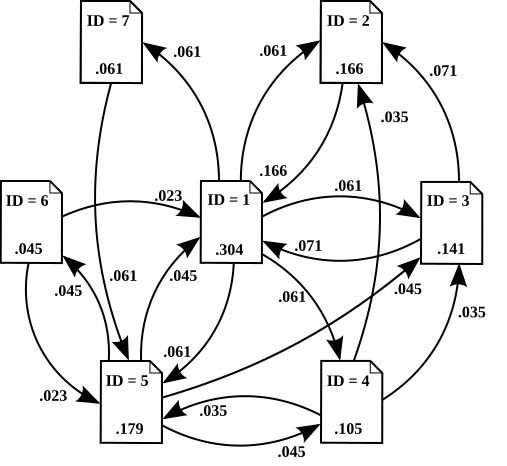
http://en.wikipedia.org/wiki/PageRank#Google_Toolbar
link analysis algorithm that assigns a numerical weighting to each element of a hyperlinked set of documents, such as the World Wide Web, with the purpose of "measuring" its relative importance within the set. The algorithm may be applied to any collection of entities with reciprocal quotations and references. The numerical weight that it assigns to any given element E is also called the PageRank of E and denoted by PR(E).
PageRank was developed at Stanford University by Larry Page (hence the name Page-Rank[1]) and later Sergey Brin as part of a research project about a new kind of search engine. The project started in 1995 and led to a functional prototype, named Google, in 1998. Shortly after, Page and Brin founded Google Inc., the company behind the Google search engine. While just one of many factors which determine the ranking of Google search results, PageRank continues to provide the basis for all of Google's web search tools.[2]
The name PageRank is a trademark of Google. The PageRank process has been patented (U.S. Patent 6,285,999). The patent is not assigned to Google but to Stanford University.
General description
Google describes PageRank:[2]
| “ | PageRank relies on the uniquely democratic nature of the web by using its vast link structure as an indicator of an individual page's value. In essence, Google interprets a link from page A to page B as a vote, by page A, for page B. But, Google looks at more than the sheer volume of votes, or links a page receives; it also analyzes the page that casts the vote. Votes cast by pages that are themselves "important" weigh more heavily and help to make other pages "important". | ” |

In other words, a PageRank results from a "ballot" among all the other pages on the World Wide Web about how important a page is. A hyperlink to a page counts as a vote of support. The PageRank of a page is defined recursively and depends on the number and PageRank metric of all pages that link to it ("incoming links"). A page that is linked to by many pages with high PageRank receives a high rank itself. If there are no links to a web page there is no support for that page.
Google assigns a numeric weighting from 0-1 for each webpage on the Internet; this PageRank denotes your site’s importance in the eyes of Google. The scale for PageRank is logarithmic like the Richter Scale and roughly based upon quantity of inbound links as well as importance of the page providing the link.
Numerous academic papers concerning PageRank have been published since Page and Brin's original paper.[3] In practice, the PageRank concept has proven to be vulnerable to manipulation, and extensive research has been devoted to identifying falsely inflated PageRank and ways to ignore links from documents with falsely inflated PageRank.
Alternatives to the PageRank algorithm include the HITS algorithm proposed by Jon Kleinberg, the IBM CLEVER project and the TrustRank algorithm.
PageRank algorithmprobability distribution used to represent the likelihood that a person randomly clicking on links will arrive at any particular page. PageRank can be calculated for any-size collection of documents. It is assumed in several research papers that the distribution is evenly divided between all documents in the collection at the beginning of the computational process. The PageRank computations require several passes, called "iterations", through the collection to adjust approximate PageRank values to more closely reflect the theoretical true value.
A probability is expressed as a numeric value between 0 and 1. A 0.5 probability is commonly expressed as a "50% chance" of something happening. Hence, a PageRank of 0.5 means there is a 50% chance that a person clicking on a random link will be directed to the document with the 0.5 PageRank.
[edit] Simplified PageRank algorithm
Assume a small universe of four web pages: A, B, C and D. The initial approximation of PageRank would be evenly divided between these four documents. Hence, each document would begin with an estimated PageRank of 0.25.
If pages B, C, and D each only link to A, they would each confer 0.25 PageRank to A. All PageRank PR( ) in this simplistic system would thus gather to A because all links would be pointing to A.

But then suppose page B also has a link to page C, and page D has links to all three pages. The value of the link-votes is divided among all the outbound links on a page. Thus, page B gives a vote worth 0.125 to page A and a vote worth 0.125 to page C. Only one third of D's PageRank is counted for A's PageRank (approximately 0.083).

In other words, the PageRank conferred by an outbound link L( ) is equal to the document's own PageRank score divided by the normalized number of outbound links (it is assumed that links to specific URLs only count once per document).

In the general case, the PageRank value for any page u can be expressed as:
 ,
,
i.e. the PageRank value for a page u is dependent on the PageRank values for each page v out of the set Bu (this set contains all pages linking to page u), divided by the number L(v) of links from page v.
[edit] PageRank algorithm including damping factor
The PageRank theory holds that even an imaginary surfer who is randomly clicking on links will eventually stop clicking. The probability, at any step, that the person will continue is a damping factor d. Various studies have tested different damping factors, but it is generally assumed that the damping factor will be set around 0.85.[4]
The damping factor is subtracted from 1 (and in some variations of the algorithm, the result is divided by the number of documents in the collection) and this term is then added to the product of (the damping factor and the sum of the incoming PageRank scores).
That is,

or (N = the number of documents in collection)

So any page's PageRank is derived in large part from the PageRanks of other pages. The damping factor adjusts the derived value downward. The second formula above supports the original statement in Page and Brin's paper that "the sum of all PageRanks is one".[3] Unfortunately, however, Page and Brin gave the first formula, which has led to some confusion.
Google recalculates PageRank scores each time it crawls the Web and rebuilds its index. As Google increases the number of documents in its collection, the initial approximation of PageRank decreases for all documents.
The formula uses a model of a random surfer who gets bored after several clicks and switches to a random page. The PageRank value of a page reflects the chance that the random surfer will land on that page by clicking on a link. It can be understood as a Markov chain in which the states are pages, and the transitions are all equally probable and are the links between pages.
If a page has no links to other pages, it becomes a sink and therefore terminates the random surfing process. However, the solution is quite simple. If the random surfer arrives at a sink page, it picks another URL at random and continues surfing again.
When calculating PageRank, pages with no outbound links are assumed to link out to all other pages in the collection. Their PageRank scores are therefore divided evenly among all other pages. In other words, to be fair with pages that are not sinks, these random transitions are added to all nodes in the Web, with a residual probability of usually d = 0.85, estimated from the frequency that an average surfer uses his or her browser's bookmark feature.
So, the equation is as follows:

where p1,p2,...,pN are the pages under consideration, M(pi) is the set of pages that link to pi, L(pj) is the number of outbound links on page pj, and N is the total number of pages.
The PageRank values are the entries of the dominant eigenvector of the modified adjacency matrix. This makes PageRank a particularly elegant metric: the eigenvector is
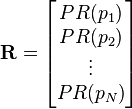
where R is the solution of the equation

where the adjacency function  is 0 if page pj does not link to pi, and normalised such that, for each j
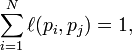
i.e. the elements of each column sum up to 1.
This is a variant of the eigenvector centrality measure used commonly in network analysis.
The values of the PageRank eigenvector are fast to approximate (only a few iterations are needed) and in practice it gives good results.
As a result of Markov theory, it can be shown that the PageRank of a page is the probability of being at that page after lots of clicks. This happens to equal t − 1 where t is the expectation of the number of clicks (or random jumps) required to get from the page back to itself.
The main disadvantage is that it favors older pages, because a new page, even a very good one, will not have many links unless it is part of an existing site (a site being a densely connected set of pages, such as Wikipedia). The Google Directory (itself a derivative of the Open Directory Project) allows users to see results sorted by PageRank within categories. The Google Directory is the only service offered by Google where PageRank directly determines display order. In Google's other search services (such as its primary Web search) PageRank is used to weight the relevance scores of pages shown in search results.
Several strategies have been proposed to accelerate the computation of PageRank.[5]
Various strategies to manipulate PageRank have been employed in concerted efforts to improve search results rankings and monetize advertising links. These strategies have severely impacted the reliability of the PageRank concept, which seeks to determine which documents are actually highly valued by the Web community.
Google is known to actively penalize link farms and other schemes designed to artificially inflate PageRank. How Google identifies link farms and other PageRank manipulation tools are among Google's trade secrets.
PageRank variations
Google Toolbar

An example of the PageRank indicator as found on the Google toolbar.
The Google Toolbar's PageRank feature displays a visited page's PageRank as a whole number between 0 and 10. The most popular websites have a PageRank of 10. The least have a PageRank of 0. Google has not disclosed the precise method for determining a Toolbar PageRank value. Google representative Matt Cutts has publicly indicated that the Toolbar PageRank values are republished about once every three months, indicating that the Toolbar PageRank values are historical rather than real-time values.[6]
[edit] Google directory PageRank
The Google Directory PageRank is an 8-unit measurement. These values can be viewed in the Google Directory. Unlike the Google Toolbar which shows the PageRank value by a mouseover of the greenbar, the Google Directory does not show the PageRank as a numeric value but only as a green bar.
[edit] False or spoofed PageRank
While the PR shown in the Toolbar is considered to be derived from an accurate PageRank value (at some time prior to the time of publication by Google) for most sites, it must be noted that this value is also easily manipulated. A current flaw is that any low PageRank page that is redirected, via a 302 server header or a "Refresh" meta tag, to a high PR page causes the lower PR page to acquire the PR of the destination page. In theory a new, PR0 page with no incoming links can be redirected to the Google home page - which is a PR 10 - and by the next PageRank update the PR of the new page will be upgraded to a PR10. This spoofing technique, also known as 302 Google Jacking, is a known failing or bug in the system. Any page's PR can be spoofed to a higher or lower number of the webmaster's choice and only Google has access to the real PR of the page. Spoofing is generally detected by running a Google search for a URL with questionable PR, as the results will display the URL of an entirely different site (the one redirected to) in its results.
[edit] Manipulating PageRank
For search-engine optimization purposes, some companies offer to sell high PageRank links to webmasters.[7] As links from higher-PR pages are believed to be more valuable, they tend to be more expensive. It can be an effective and viable marketing strategy to buy link advertisements on content pages of quality and relevant sites to drive traffic and increase a webmaster's link popularity. However, Google has publicly warned webmasters that if they are or were discovered to be selling links for the purpose of conferring PageRank and reputation, their links will be devalued (ignored in the calculation of other pages' PageRanks). The practice of buying and selling links is intensely debated across the Webmastering community. Google advises webmasters to use the nofollow HTML attribute value on sponsored links. According to Matt Cutts, Google is concerned about webmasters who try to game the system, and thereby reduce the quality of Google search results.[7]
[edit] Other uses of PageRank
A version of PageRank has recently been proposed as a replacement for the traditional ISI impact factor,[8] and implemented at eigenfactor.org. Instead of merely counting total citation to a journal, the "importance" of each citation is determined in a PageRank fashion.
A similar new use of PageRank is to rank academic doctoral programs based on their records of placing their graduates in faculty positions. In PageRank terms, academic departments link to each other by hiring their faculty from each other (and from themselves).[9]
PageRank has also been used to automatically rank WordNet synsets according to how strongly they possess a given semantic property, such as positivity or negativity.[10]
A dynamic weighting method similar to PageRank has been used to generate customized reading lists based on the link structure of Wikipedia.[11]
A Web crawler may use PageRank as one of a number of importance metrics it uses to determine which URL to visit next during a crawl of the web. One of the early working papers[12] which were used in the creation of Google is Efficient crawling through URL ordering,[13] which discusses the use of a number of different importance metrics to determine how deeply, and how much of a site Google will crawl. PageRank is presented as one of a number of these importance metrics, though there are others listed such as the number of inbound and outbound links for a URL, and the distance from the root directory on a site to the URL.
Google's "rel='nofollow'" proposal
In early 2005, Google implemented a new value, "nofollow", for the rel attribute of HTML link and anchor elements, so that website builders and bloggers can make links that Google will not consider for the purposes of PageRank — they are links that no longer constitute a "vote" in the PageRank system. The nofollow relationship was added in an attempt to help combat spamdexing.
As an example, people could create many message-board posts with links to their website to artificially inflate their PageRank. Now, however, the message-board administrator can modify the code to automatically insert "rel='nofollow'" to all hyperlinks in posts, thus preventing PageRank from being affected by those particular posts.
This method of avoidance, however, also has various drawbacks, such as reducing the link value of actual comments. (See: Spam in blogs#rel="nofollow")
Abonohu te:
Komentet (Atom)